EP‑Manager
Endoscopy Program Manager for Dental
A centralized endoscopy & medical imaging management system for dental clinics and multi‑site groups. Supports DICOM and non‑DICOM images/videos captured by intraoral/endoscopic devices, with Web/PWA, desktop, and mobile viewing. Deployable on‑prem or in a private cloud.
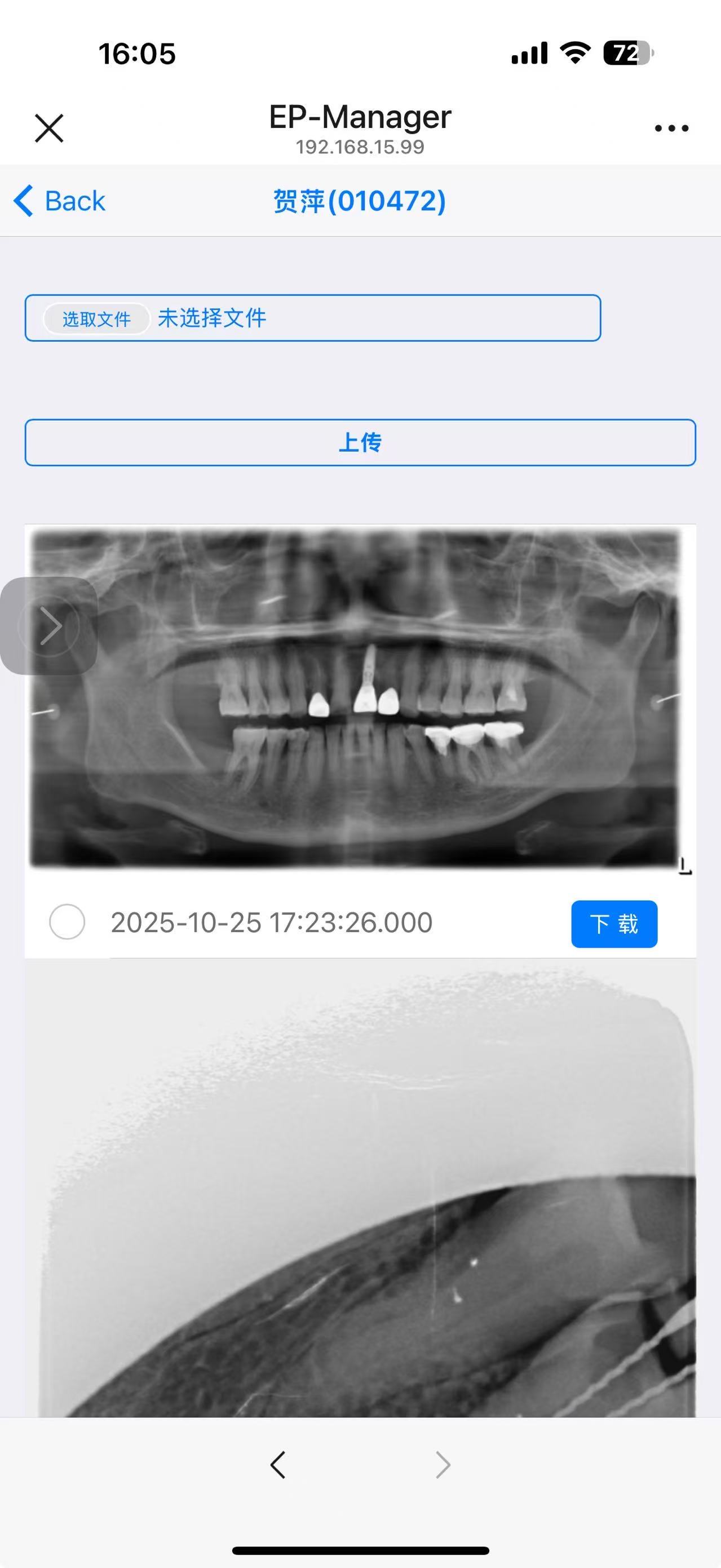
Ver 3.23 released on july 2025
1. Goals & Scope
- Centralized storage: Consolidate endoscopic captures (photos/videos) and radiology (e.g., CBCT/OPG/ceph) in a single server.
- Standards‑compliant: DICOM & DICOMweb (QIDO‑RS/WADO‑RS/STOW‑RS) to interoperate with PACS, workstations, and HIS/EMR.
- Multi‑client viewing: Unified Web/PWA (mobile), and optional desktop (Electron). Offline cache & weak‑network resilience.
- Workflow coverage: Patient registration → exam/procedure → capture → review → annotation/measurement → reporting → patient sharing → follow‑up archiving.
- Privacy & compliance: PIPL (China), Data Security Law, and—if applicable—GDPR. End‑to‑end encryption and granular audit.
Out of scope (this version): billing, pharmacy, non‑imaging tests (can be integrated via APIs).
2. Personas & Use Cases
- Dentist/Attending: View live/near‑live feed, capture keyframes, post‑op review, side‑by‑side comparison, annotations & measurements.
- Nurse/Technician: Start exams from a worklist, control capture and metadata, quality control, archive.
- Administrator/Owner: Utilization dashboards, quality metrics, compliance audit.
- Patient/Family (optional): Secure, de‑identified share links or mini‑program to view before/after comparisons and reports.
3. High‑Level Architecture
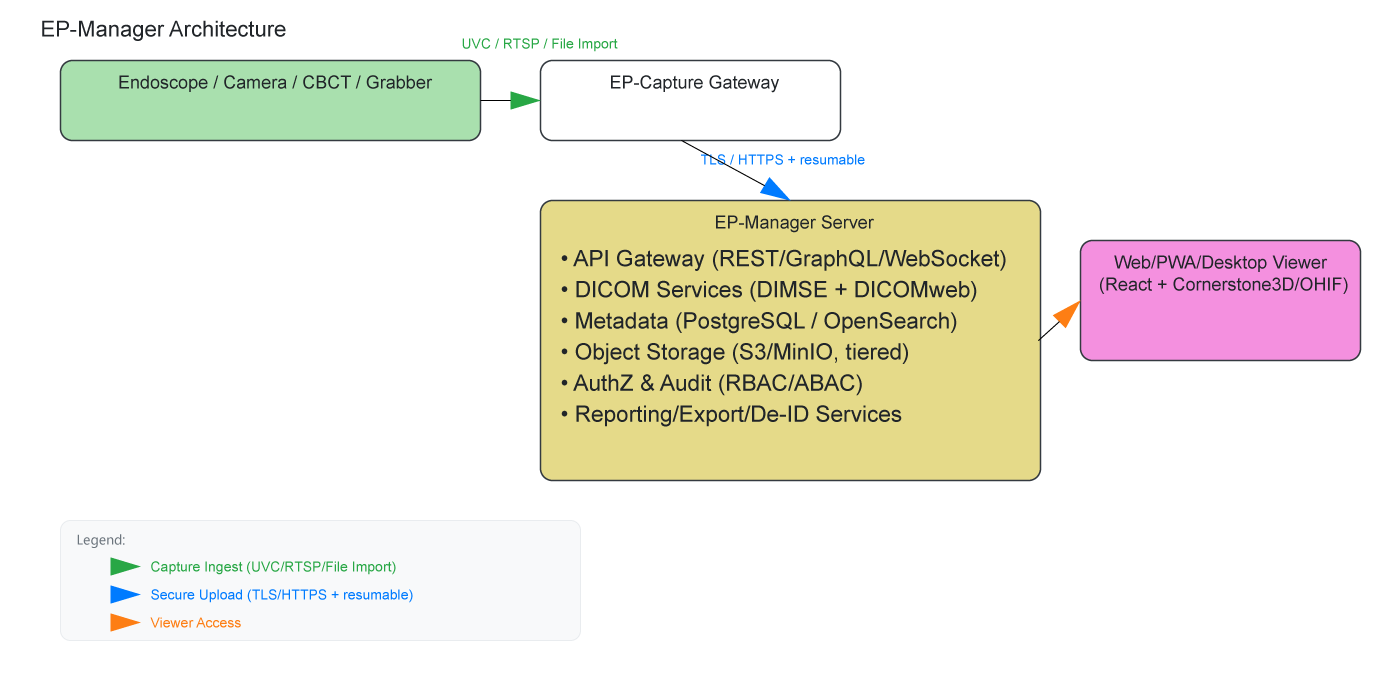
Key components - EP‑Capture Gateway: Installed on a workstation (Windows/macOS/Linux) or an embedded box attached to the endoscope. Provides live preview, still/video capture, metadata entry, upload to server. Wraps non‑DICOM media into DICOM (Secondary Capture / Encapsulated Video/PDF) with patient/study/device tags. - DICOM subsystem: Orthanc or dcm4chee as the core; enable both DIMSE and DICOMweb. - Object storage: MinIO/S3‑compatible, hot/warm/cold tiers (original media, derivatives, thumbnails, report PDFs, export bundles). - Metadata index: PostgreSQL as the source of truth; OpenSearch/Elasticsearch for search and audit logs. - Viewing: React + Cornerstone3D (or OHIF) for window/level, measurements, annotations, multi‑pane compare, video timeline.
4. Runtime & Hardware Sizing
4.1 Server (single site, ~5–20 endpoints)
- OS: Ubuntu Server LTS 22.04/24.04 (or Windows Server).
- CPU: ≥ 8 vCPU.
- RAM: ≥ 32 GB (including index services).
- Storage: RAID1/5 or NAS; plan annual capacity (see §12). Prefer S3/MinIO + disk array.
- Network: 1 Gbps LAN; dedicated line or VPN for external/branch access.
- Optional GPU: 8–16 GB VRAM for 3D/AI inference.
4.2 Capture workstation / edge box
- I/O: USB3 UVC grabbers or Ethernet (RTSP H.264/H.265).
- Spec: 4‑core CPU / 8 GB RAM / 256 GB SSD (minimum).
- OS: Windows 10/11, macOS, or Ubuntu Desktop.
- Peripherals: Foot switch/hardware button for capture.
4.3 Clients
- Browser: Latest Chrome/Edge/Safari.
- Mobile: PWA (iOS/Android) or mini‑program shell.
- Desktop: Optional Electron for quick launch & device access.
5. Feature Set
- Patient & Exam Management: Patient/Visit/Study/Series/Instance hierarchy; HIS/EMR sync (HL7 v2/FHIR).
- Worklist: Daily schedule by department/device; bind patient via QR code or manual entry.
- Endoscopy Capture:
- Live preview (target latency < 150 ms, path‑dependent);
- One‑tap still capture / short clip recording;
- Auto thumbnails & keyframe timeline;
- Wrap JPG/MP4 as DICOM (Encapsulated Video/PDF, Secondary Capture).
- DICOM Interop:
- DIMSE: C‑STORE/C‑FIND/C‑MOVE;
- DICOMweb: QIDO‑RS/WADO‑RS/STOW‑RS;
- PACS/workstation routing rules (by modality/department/device).
- Web/Mobile Viewer:
- 2D tools: window/level, length/angle/area, multi‑label annotations;
- Multi‑pane compare across timepoints;
- Drawing templates, bookmarks/keyframes;
- Video frame‑by‑frame, playback rate, segment export.
- Reporting & Export: Templated reports (logo/e‑signature/watermark), export as PDF/images, secure share links (expiry + burn‑after‑read).
- Search: By patient, date, procedure, keyword, tags, device, operator, anatomy; pinyin/fuzzy search.
- Auth & Audit: Role‑based + attribute‑based access; IP allowlist; full audit trail.
- De‑Identification: One‑click de‑ID for export (remove/replace PHI), teaching mode.
- Backup & Lifecycle: Local snapshots + remote object replication (WORM/versioning); tiered policies.
- Multi‑site/Multi‑tenant (optional): Isolation by org/department; cross‑site mirroring/sync.
- Extensions (optional):
- AI assistants (quality triage, enhancement, lesion hints);
- Dental‑specific tools (gingival margin, periodontal pocket annotations, pre‑/post‑op compare);
- Cephalometric/craniofacial analysis module integration.
6. Technology Choices
- Backend:
- Language/Framework: Python FastAPI or Go (Gin/Fiber).
- DICOM core: Orthanc (plugin‑friendly) or dcm4chee (feature‑rich).
- Storage: MinIO (S3) for originals & DICOM objects.
- DB: PostgreSQL (primary) + OpenSearch/Elasticsearch (search/logs).
- MQ: NATS / RabbitMQ / Kafka for ingestion/transcode/background jobs.
- Cache: Redis (sessions, rate‑limit, queues, hot lists).
- Frontend:
- React + TypeScript; UI (Ant Design or shadcn/ui).
- Cornerstone3D / OHIF as the WebGL viewing core.
- PWA: offline cache, notifications, Add‑to‑Home‑Screen.
- Capture side:
- Cross‑platform (Electron/Qt) or native (Win/macOS).
- UVC/RTSP ingest, FFmpeg/GStreamer pipeline, HW encode (H.264/H.265).
- Auth & SSO:
- OAuth 2.1 / OIDC (Keycloak/Authentik), SSO, MFA, LDAP/AD.
- Deployment:
- Docker Compose (small) or Kubernetes (HA/multi‑site).
7. Conceptual Data Model
- Patient ↔ Encounter/Visit ↔ Study ↔ Series ↔ Instance
- EndoscopicMedia: mapping of non‑DICOM sources (JPG/PNG/MP4) and derived DICOM wrappers
- Device (endoscope/grabber/workstation)
- User/Role/Scope (accounts/roles/domains)
- Annotation/Measurement
- Report
- Consent (share link/auth records)
- AuditLog
8. APIs & Interoperability
8.1 REST/GraphQL (samples)
- POST /api/patients create patient
- GET /api/studies?patientId=...&modality=ES query endoscopy studies
- POST /api/media/upload direct upload (S3 presign + resumable)
- POST /api/dicom/stow upload via STOW‑RS
- GET /api/dicom/wado/{studyUid} retrieve pixels/metadata (WADO‑RS)
- WS /api/live/{deviceId} live preview & keyframe events
8.2 DICOM/DICOMweb
- QIDO‑RS: Study/Series/Instance query
- WADO‑RS: pixel/metadata retrieval
- STOW‑RS: DICOM object storage
- DIMSE: C‑STORE/C‑FIND/C‑MOVE (interop with hospital PACS)
8.3 External Systems
- HL7 v2 (ADT/ORM/ORU) or FHIR R4 (Patient/Encounter/ImagingStudy/DiagnosticReport)
- Webhooks: on exam completion/report issuance/share access
9. Security & Compliance
- Transport: HTTPS/TLS 1.2+; optional mTLS for internal traffic.
- Data at rest: S3 SSE + DB encryption; app‑level encryption for sensitive fields (name/ID).
- Access control: RBAC + ABAC (e.g., restrict to org/department scope).
- Least privilege: S3 bucket/prefix policies, presigned uploads/downloads.
- Audit: log authentication, downloads/exports/shares with traceability.
- Privacy: comply with PIPL/data export assessments; de‑ID/teaching modes; consent records.
- Continuity: define RPO/RTO, offsite backups, regular DR drills.
10. Deployment Topologies
- Single‑site on‑prem (recommended start): one physical server or VM cluster via Docker Compose.
- Multi‑site/private cloud: Kubernetes + object storage cluster; cross‑site sync; centralized monitoring & identity.
- Edge node: OR/operatory capture box (EP‑Capture Edge) with local cache + offline upload retries.
Sample docker-compose (trimmed):
version: "3.9"
services:
  minio:
    image: minio/minio:RELEASE
    command: server /data --console-address ":9001"
    environment:
      - MINIO_ROOT_USER=epadmin
      - MINIO_ROOT_PASSWORD=StrongPwd123!
    volumes:
      - minio-data:/data
    ports: ["9000:9000", "9001:9001"]

  postgres:
    image: postgres:16
    environment:
      - POSTGRES_PASSWORD=epmanager
    volumes:
      - pg-data:/var/lib/postgresql/data

  orthanc:
    image: jodogne/orthanc-plugins:latest
    volumes:
      - orthanc-storage:/var/lib/orthanc/db
      - ./orthanc.json:/etc/orthanc/orthanc.json:ro
    ports: ["4242:4242", "8042:8042"]

  api:
    image: ghcr.io/yourorg/ep-manager-api:latest
    env_file: .env
    depends_on: [postgres, minio, orthanc]
    ports: ["8080:8080"]

volumes:
  minio-data: {}
  pg-data: {}
  orthanc-storage: {}
11. Operations & Monitoring
- Logs: structured JSON to Loki/ELK with tiered retention.
- Metrics: Prometheus + Grafana (API latency/error rate, ingest rate, disk watermarks, transcode time).
- Alerting: IM/email integrations; SLA trend reports.
- Config mgmt: 12‑Factor; secrets via Vault/Sealed Secrets.
12. Performance & Capacity Planning
- Concurrent viewing: ≥ 50 sessions (mid‑size install).
- Typical assets:
- Single endoscopic JPEG: 1–5 MB
- One‑minute 1080p clip (H.264): ~80–150 MB (bitrate‑dependent)
- DICOM secondary capture/encapsulated sizes vary by codec
- Annual capacity example (100 cases/day; 10 images + one 1‑min video per case):
- Images: 100 × 10 × 3 MB × 365 ≈ 1.1 TB/year
- Video: 100 × 150 MB × 365 ≈ 5.4 TB/year
- Total: ~6.5 TB/year (plan 1.5–2× headroom)
13. Capture & Transcoding Pipeline
- Ingress:
- UVC grabber (endoscope/intraoral camera) → raw frames → H.264/H.265 encode
- RTSP pull (network endoscope) → denoise/deinterlace → keyframe extraction
- Triggers: hardware button/foot switch/UI/hotkey
- Transcode & segment: FFmpeg/GStreamer; generate thumbnails (JPEG/WebP); HLS/DASH previews for Web
- DICOM wrapping: map Patient/Study/Series/Instance UIDs; set Modality=ES/SC; record device/operator tags
- Ingestion policy: retry with resume, view‑while‑upload
14. Viewer UX Highlights
- Workbench: today’s tasks, my studies, device status, quick import
- Viewer: multi‑pane layout, tool palette, hotkeys, measurements overlay, keyframe timeline
- Compare: pre‑ vs post‑op, same anatomy across timepoints
- Report editor: WYSIWYG, insert annotated snapshots, auto numbering/TOC
- Sharing: one‑click secure link (password/expiry/IP limit/burn‑after‑read/watermark)
15. Secure Links & De‑Identification
- De‑ID templates: bulk removal/hash of PHI (PatientName/ID), or pseudonymization
- Visible watermarks: department/operator/timestamp/visitor IP
- Access policy: least privilege, shortest expiry, single‑use tokens
16. Backup, Archive & DR
- Backups: daily DB + weekly full; object versioning enabled
- Archival: move to cold tier N days after completion
- DR: active‑active (same city) or cold standby (remote)
- Drills: quarterly restore tests with audit
17. Testing & Acceptance
- E2E chain: capture → wrap → ingest → query → view → export
- Perf/load: steps at 50/100/200 concurrent sessions
- Compatibility: browsers/mobile/displays (color/DPI)
- Interop: PACS/HIS/EMR integration scenarios
18. Phased Roadmap
- MVP: patient/study, capture & upload, basic viewer, PDF export
- DICOM complete: STOW/QIDO/WADO, PACS interop, auth & audit
- Mobile & sharing: PWA, de‑ID links, templated reporting
- Multi‑site & AI: multi‑tenant, cross‑site sync, QC/analytics models
19. Risks & Mitigations
- Vendor DICOM variance → mapping tables & adapter layer
- Video growth → tiered storage + lifecycle cleanup + archive compression
- Weak/offline network → edge cache + resumable transfers
- Compliance → data minimization, strong audit & alerting
20. Configuration Examples
Orthanc (snippet)
{
  "Name": "EP-Orthanc",
  "DicomAet": "EPORTHANC",
  "DicomPort": 4242,
  "HttpPort": 8042,
  "AuthenticationEnabled": true,
  "RemoteAccessAllowed": false,
  "StorageCompression": true}
S3 Presigned Direct‑Upload Flow 1) Client requests /api/media/presign → PUT URL 2) Client uploads directly to object storage 3) Callback /api/media/commit to persist metadata 4) Async thumbnail & DICOM wrapping jobs
21. Glossary
- DICOM: Digital Imaging and Communications in Medicine
- PACS: Picture Archiving and Communication System
- QIDO/WADO/STOW: DICOMweb query/retrieve/store APIs
- PHI: Protected Health Information
- PWA: Progressive Web App
22. Optional Enhancements
- OR mode: foot pedal + keyframe bookmarking
- Case‑bundle exports for implant guides/orthodontic software
- Patient‑facing pre‑op education & post‑op follow‑up kits
Regulatory note: If used for diagnostic purposes, assess whether it qualifies as SaMD (Software as a Medical Device) and follow applicable registration/quality/cybersecurity requirements. For non‑diagnostic archival/teaching, follow general IT/infosec policies and hospital rules.
Contact
HISING TRADING (HONGKONG) LIMITED / 海幸商貿(香港)有限公司24/F O, Kingley Industral Building 1, 35 Yip Kan Street, Hongkong